Patch Notes
This page records changes to the education modules and coding tutorials. The version and date shown at the top of each module correspond to the entries below.
v1.2 — September 2026
Neuroglancer scenes and segmentation
- Stable, hosted scenes. Every module’s Neuroglancer link now loads a static scene hosted in a public cloud bucket rather than a link-shortener state. The links are permanent and no longer depend on the state server.
- Pinned to one dataset version. All scenes now use the flat (static) segmentation for a single materialization version (v1300) instead of the dynamic segmentation layer, so every module shows the same, consistent state of the data.
- Consistent look. Imagery shading, segment opacity, axis lines, and the 3D view are now standardized across scenes.
- Updated neuron IDs (Module 1). The V1/HVA column exercise now lists the root IDs as they exist in v1300. Root-ID lists are also comma-separated so they can be pasted directly into the dash apps (Neuroglancer accepts either, but the dash apps expect commas).
- Synapse layer (Module 4). The cell-type scenes now include a static v1300 synapse-prediction layer. It is off by default — turning it on is part of the exercise.
Module 2 — Organelles
- Moved Synapse-1 to reflect a typical synapse.
Module 3 — Known Inputs
- The Known Inputs annotations now include only inputs whose presynaptic partner is a valid, proofread cell at v1300 (333 of the original 355 are retained).
Dash apps
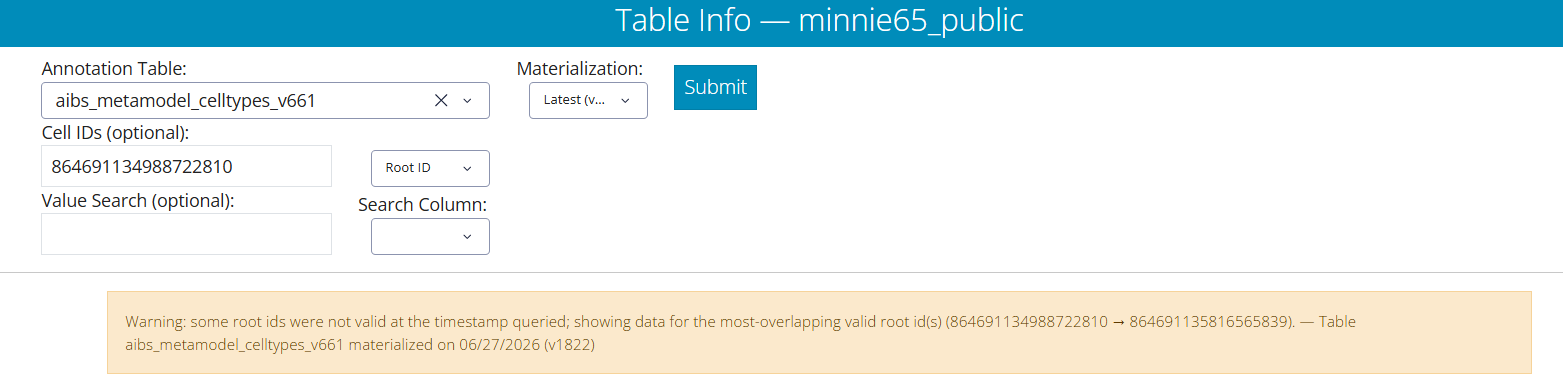
- Table Viewer now auto-resolves root IDs. When a pasted root ID is not valid at the queried materialization version, the Table Viewer automatically looks up and shows data for the most-overlapping valid root ID, and displays a warning noting the substitution. This means an out-of-date root ID will still return the intended cell.
New resource pages
Two reference pages were added under the Resources menu:
- Layer Catalogue — every optional Neuroglancer layer used across the modules (reference meshes, column boundaries, synapse layers, organelle markers, CCF context), what each shows, and how to add it to a scene.
- Troubleshooting FAQ — common issues: recommended browser, login and Terms of Service, why scenes may not render, dataset versions, static vs. dynamic (Graphene) segmentation, and the Dash-App root-ID warning.
v1.1 — July 2026
- Added troubleshooting guidance for Neuroglancer login and the MICrONS Terms of Service.
- Added support links (Report Issue, Join Discussion) to the navigation bar and module pages.
- Added version information to each module page.
v1.0
- Initial release of the four education modules and the coding tutorials.