Abstract
Reproducibility is a significant challenge in neuroscience, as analysis and visualization methods are often difficult to replicate due to a lack of accessible code, separation of code from published figures, or unavailability of code altogether. This issue may arise from the complex nature of neuroscience research, the use of diverse data formats and analysis techniques, and insufficient emphasis on open-source, collaborative practices. In addition, key neuroscience analyses are typically rewritten at the start of new scientific projects, slowing down the initiation of research efforts.
Four key components are essential for reproducible analysis: accessible data, accessible computational resources, a reproducible environment, and usage documentation. The OpenScope Databook, provided by the Allen Institute’s OpenScope Project, offers a solution to these challenges by facilitating the analysis and visualization of brain data, primarily using NWB files and the DANDI Archive. Hosted on GitHub, the entire publication – including code, data access, text, references, and revisions from reviewers and contributors – is readily available for collaboration and version control, promoting transparency and collective knowledge growth. The OpenScope Databook addresses these components by leveraging a combination of open-source Python libraries, such as DANDI, Binder, Jupyter Book, LaTeX references, Python scripts, Git versioning, and scientific revision through approved pull requests. The entire publication can be recreated by running the code locally, on distributed servers such as Binder, DandiHub, or on any host running Jupyter notebooks.
We cover several broadly used analyses across the community, providing a missing component for system neuroscience. Our key analyses are organized into chapters, including NWB basics such as downloading, streaming, and visualizing NWB files from data archives. We document essential analyses typically performed in all neuroscience laboratories, such as temporal alignment, alignment to sensory stimuli, and association with experimental metadata. We cover the two leading neuronal recording techniques: two-photon calcium imaging and electrophysiological recordings, and share example analyses of stimulus-averaged responses. Advanced first-order analyses include showing receptive fields, identifying optotagged units, current source density analysis, and cell matching across days.
This resource is actively maintained and can be updated by the community, providing a living document that will grow over time.
The OpenScope Databook: Reproducible System Neuroscience Notebooks to Facilitate Data Sharing and Collaborative Reuse with Open Science Datasets
How Can I Use It?
There are four primary ways to run this code: Locally, with Binder, in Google Colab, or with DandiHub.
Quick Start: Cloud Execution
Launch the Databook in the cloud with Binder or DANDIHub using the links below:


Google Colab works a little differently. Colab can only open a specific .ipynb file, not the Databook landing page or the docs/ directory as a whole. For that reason, Colab badges are added automatically to individual notebook pages when the project is built. Open a notebook page in the Databook and click its Open in Colab badge to launch that notebook in Colab.
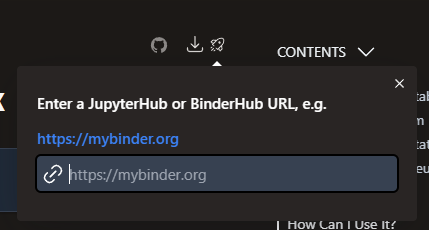
From a notebook page in the built Databook, you can also use the launch controls in the top navigation. Click the launch icon, enter a BinderHub or JupyterHub URL such as https://mybinder.org, and MyST will generate a launch link for the current notebook page.
Locally
You can download an individual notebook by pressing the Download button in the top-right and selecting .ipynb. Alternatively, you can clone the repo to your machine and access the files there. The repo can be found by clicking the GitHub button in the top-right.
git clone --depth 1 https://github.com/AllenInstitute/openscope_databook.gitLocally (Preferred: uv)
Use Python 3.13. Then install and sync with:
python -m pip install uv
uv sync --frozen --extra dev --python 3.13
Run notebooks/tools through uv (for example):
uv run jupyter notebook ./docsLocally (Pip-only fallback)
If you prefer not to use uv, create a Python 3.13 virtual environment and install from exported requirements:
python -m pip install -r requirements-ci.txt
python -m pip install -e .
Locally (Conda)
If you prefer conda for environment isolation, create a Python 3.13 conda environment first, then follow either the uv or pip-only installation steps above. For information on installing and using conda, go here. You can create a conda environment with:
conda create -n databook_env python=3.13and you can run that environment with
conda activate databook_envLocally (Docker)
The Databook also includes a dockerfile. If you want to build a docker container for the Databook yourself (for some reason), you can do so by running the following command in the Databook main directory after you have docker installed and running
docker build -t openscope_databook .You can then run the container with the following command. Note that, to access the Databook in your host machine’s web browser, port 8888 should be mapped to the container’s port.
docker run -p 8888:8888 openscope_databookInstead of building the container yourself, you can use the main docker container that we maintain, registered publicly on Docker hub with the following command
docker run -p 8888:8888 rcpeene/openscope_databook:latestLocally (Running Notebook)
Once your environment is setup, you can execute the notebooks in Jupyter by running the following command within the repo directory:
jupyter notebook ./docsBinder
Binder will automatically set up the environment with repo2docker and then execute the code in an instance of JupyterHub where the kernel is run. JupyterHub offers a lot of utilities for interacting with Jupyter notebooks and the environment. You can launch Binder either from the badge above or from a notebook page in the built Databook by using the launch controls in the top navigation and entering a BinderHub URL such as https://mybinder.org. Occasionally, Binder will have to rebuild the environment before starting JupyterLab, which can take many minutes.
Google Colab
Google Colab is best suited for opening and running an individual notebook rather than the Databook as a whole. Each notebook page in the built Databook includes an automatically generated Open in Colab badge that links directly to that notebook’s .ipynb file in GitHub. Clicking that badge opens the notebook in Colab, where you can run it in a hosted Python environment.
DANDIHub
DANDIHub is an instance of JupyterHub hosted by the DANDI Archive. To use it, navigate to https://hub.dandiarchive.org in your browser and sign in with your GitHub account. From there you will need to set up the environment yourself — there is no pre-built OpenScope image available. Follow the Locally (uv) or Locally (Pip-only fallback) instructions above after launching your server. Once the environment is ready, navigate to the openscope_databook/docs directory which contains the OpenScope notebooks.
How Does It Work?
Reproducible analysis requires four components:
Accessible Data
Accessible Computational Resources
Reproducible Environment
Documentation of Usage
The Databook uses several technologies to combine those components into an interactive publication.
Data
Data is accessed from the DANDI Archive and downloaded via the DANDI Python API within notebooks. Most notebooks make use of publicly available datasets on DANDI, but for some notebooks, there is not yet sufficient publicly-available data to demonstrate our analysis. For these, it is encouraged to use your own NWB Files that are privately stored on DANDI.
Computation
This project utilizes Binder, as the host for the environment and the provider of computational resources. Conveniently, Binder has support for effectively replicating a computational environment from a GitHub Repo. Users of the Databook don’t have to worry about managing the environment if they prefer to use our integrated Binder functionality. However, the Databook can be run locally or on other hosts. Details about the different ways to run this code can be found in the section How Can I Use It? above.
Environment
As mentioned above, Binder is capable of reproducing the environment in which to run this code. There are also other options for creating the necessary environment. Instructions for running this code locally can be found in the section How Can I Use It? above.
Documentation
The great part about this Databook is that the usage of the code is explained within each notebook. The instructions found here should be sufficient for utilizing our code and accurately reproducing a number of different analyses on the relevant data.
Statement of Support
We are releasing this code to the public as a tool we expect others to use. We are actively updating and maintaining this project. Issue submissions here are encouraged. Questions can be directed to @rcpeene or @jeromelecoq. We are open to hearing input from users about what types of analysis and visualization might be useful for reproducible neuroscience, particularly when working with the NWB standard.